Site Settings
Site settings are admin-configurable runtime settings stored in the poracle_web.site_settings database table. Unlike appsettings.json configuration which requires a restart, site settings are changed at runtime via the Admin > Settings page and take effect immediately.
First-time setup
On first startup after upgrade, the SettingsMigrationStartupService automatically migrates any existing data from the deprecated pweb_settings key-value store to the structured site_settings table. This is idempotent and safe to run multiple times.
How it works
- Settings are stored in the
poracle_web.site_settingstable with columns:category,key,value, andvalue_type. - The admin panel at Admin > Settings provides a grouped UI for editing all settings.
- Changes take effect immediately — no app restart is needed.
- Boolean settings use
"True"/"False"string values. - Keys beginning
disable_store the disabled state, but the admin UI shows them as positive switches — the toggle is on when the feature is available. The stored value is inverted on read and write, so what the API and the tables below describe is the key, not the switch. - Some settings have conditional visibility (e.g.,
allowed_role_idsonly appears whenenable_rolesis enabled).
Branding
Customize the appearance and navigation of your PoracleWeb.NET instance.
| Key | Label | Type | Description |
|---|---|---|---|
custom_title |
Site Title | string | Name shown in the browser tab and page header. One of the five keys served without authentication, alongside enable_discord, enable_telegram, favicon_url and signup_url. |
header_logo_url |
Header Logo URL | url | URL for a custom logo image in the header (replaces the default Pokeball). Leave empty for the default logo. |
hide_header_logo |
Hide Header Logo | boolean | Hide the logo from the header entirely. |
favicon_url |
Favicon URL | url | URL for the browser-tab icon. Square image recommended (32×32 minimum). Supports .ico, .png, and .svg. Leave empty to use the bundled default. Also loads on the public login page. See Favicon caveats below. |
custom_page_name |
Nav Link Label | string | Label for a custom navigation link in the sidebar (e.g., "Back To Map"). Leave empty to hide. |
custom_page_url |
Nav Link URL | url | URL the custom nav link points to. |
custom_page_icon |
Nav Link Icon | string | FontAwesome class for the nav link icon (e.g., fas fa-map). |
Favicon caveats
- Browser cache. Browsers cache favicons aggressively and often ignore normal reloads. After changing
favicon_url, users must clear their browser cache or hard-refresh (Ctrl+F5 / Cmd+Shift+R) to see the new icon. Mobile browsers may require removing and re-adding any home-screen bookmark. - Content Security Policy. If the instance is served behind a reverse proxy or CDN that adds a CSP header, the favicon URL's origin must be allowed by the
img-srcdirective. When the fetch is blocked, the browser silently falls back to the bundled default — the preview in the admin UI will show the error state to help diagnose this. - Supported formats.
.ico,.png, and.svgare reliably supported by current browsers. Avoid animated GIFs — support is inconsistent. - Hosting. Any HTTPS URL works. If you want to serve the favicon alongside PoracleWeb itself, drop the file into the container's
wwwroot/and reference it by relative path (e.g.my-favicon.png).
Alarm Types
Control which alarm categories are available to users. Disabling a type hides it from the sidebar navigation and prevents access.
| Key | Label | Type | Description |
|---|---|---|---|
disable_mons |
Pokémon | boolean | Hide Pokémon alarms from all users. The page, the sidebar item and the API all go; rules already stored stay dormant and return if you switch it back on. |
disable_raids |
Raids | boolean | Hide raid alarms from all users. The page, the sidebar item and the API all go; rules already stored stay dormant and return if you switch it back on. |
disable_quests |
Quests | boolean | Hide quest alarms from all users. The page, the sidebar item and the API all go; rules already stored stay dormant and return if you switch it back on. |
disable_invasions |
Invasions | boolean | Hide invasion alarms from all users. The page, the sidebar item and the API all go; rules already stored stay dormant and return if you switch it back on. |
disable_lures |
Lures | boolean | Hide lure alarms from all users. The page, the sidebar item and the API all go; rules already stored stay dormant and return if you switch it back on. |
disable_nests |
Nests | boolean | Hide nest alarms from all users. The page, the sidebar item and the API all go; rules already stored stay dormant and return if you switch it back on. |
disable_gyms |
Gyms | boolean | Hide gym alarms from all users. The page, the sidebar item and the API all go; rules already stored stay dormant and return if you switch it back on. |
disable_fort_changes |
Fort Changes | boolean | Hide fort-change alarms from all users. The page, the sidebar item and the API all go; rules already stored stay dormant and return if you switch it back on. |
disable_maxbattles |
Max Battles | boolean | Hide max-battle alarms from all users. The page, the sidebar item and the API all go; rules already stored stay dormant and return if you switch it back on. |
A disabled type disappears completely
The sidebar item, the dashboard card and the page all go, and every endpoint for that type answers 403 — reads, writes and deletes alike. Admins are not exempt.
Rules a user already had are not deleted. They stay in Poracle's database, dormant: a disabled type's alerts are dropped upstream, so nothing fires. Switch the type back on and everything reappears exactly as it was.
Poracle can switch these off too, and it wins
Poracle has its own per-type flags (disable_pokemon, disable_raid, disable_quest, disable_invasion, disable_lure, disable_nest, disable_gym, disable_max_battle, disable_fort_update). When one of those is set, its processor drops the webhook and its bot refuses the command, so the type can never fire — and this site now honours that. A type is off if either side disables it.
The toggle for a type Poracle has disabled renders off and greyed, with a note saying where the decision came from; switching it on here would promise something every write refuses. This is also the case where leaving existing alarms deletable matters most: Poracle's bot refuses the matching command while the type is off, so this page is the only place left to clean up.
 Your own toggles still work for everything Poracle leaves enabled, and they gate features Poracle has no opinion about.
If Poracle is unreachable, or too old to report its flags, the settings on this page are in sole charge — the gate fails open rather than disabling every type because a server was down.
Features
Toggle user-facing features on or off.
| Key | Label | Type | Description |
|---|---|---|---|
disable_areas |
Areas | boolean | Prevent users from managing their area subscriptions. |
disable_profiles |
Profiles | boolean | Prevent users from creating and switching alarm profiles. |
disable_location |
Location | boolean | Gates the whole location API, not just the pin. Users cannot set their pin, and saved places, static and distance map images, and the weather lookups on the dashboard all stop with it. Since "Near a place" delivery scope measures from a saved place or the pin, alarms already using it keep working but nothing new can be pointed at a place. |
disable_nominatim |
Geocoding | boolean | Stops all outbound geocoding. The address search and reverse lookup return 403, and the location dialog hides its search box. Users can still set a pin by coordinates or on the map. Turn this on if you do not want your instance making requests to a third-party geocoder. |
disable_update_check |
Do not check for updates | boolean | Stops the version check against api.github.com and raw.githubusercontent.com, which runs when an admin opens the Versions card and is cached six hours afterwards. Two anonymous GETs, no identifiers and no payload. With it on, the Versions card on Admin > Settings still reports the running versions but cannot say whether they are current. |
disable_user_geofences |
Custom Geofences | boolean | Hides the My Geofences page and the admin review queue, and 403s the create, rename, import, submit, activate and deactivate endpoints. Delete is deliberately left open, so a user can still clear out a geofence they no longer want. Geofences that already exist keep being served in the geofence feed and keep matching. See Admin operations. |
enable_templates |
Templates | boolean | Allow users to choose notification message templates. |
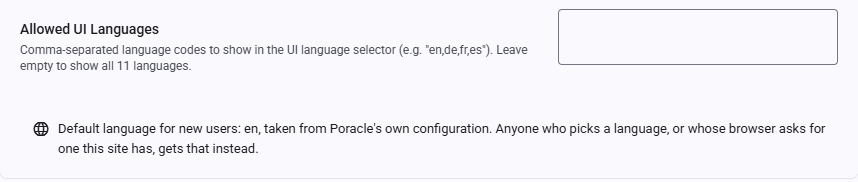
allowed_languages |
Allowed UI Languages | csv | Comma-separated language codes users can select (e.g., en,de,fr). Leave empty to show all 11 languages. Applies to the signed-out login page as well. English is always available. |
Beneath that row the page reports Poracle's own configured locale, which is the language a first-time visitor lands on when neither a stored choice nor their browser can answer. It is read from Poracle and cannot be set here — see Values that are not settings.
Administration
Access control.
| Key | Label | Type | Description |
|---|---|---|---|
enable_roles |
Enable Role-Based Access | boolean | Only allow users with specific Discord roles to log in. Requires Discord:BotToken and Discord:GuildId in appsettings. |
allowed_role_ids |
Allowed Role IDs | csv | Comma-separated Discord role IDs (e.g., 123456789,987654321). A user needs at least one of these roles to log in. Leave empty to allow all. Only visible when enable_roles is enabled. |
Role-based access prerequisites
Role-based access requires Discord:BotToken and Discord:GuildId to be configured in appsettings. Without these, role checks cannot be performed and the setting has no effect.
Formatting allowed_role_ids
Enter the IDs bare: 123456789,987654321. Surrounding quotes are stripped, but any entry that is not a numeric Discord role ID is ignored and logged as a warning. If nothing usable is left, non-admin logins are denied with role_check_failed rather than silently allowing everyone. Admins can always log in, so a bad value can be corrected from the admin panel.
Discord
| Key | Label | Type | Description |
|---|---|---|---|
enable_discord |
Enable Discord Login | boolean | Allow Discord sign-in. Requires Discord:ClientId and Discord:ClientSecret in appsettings. Nothing here affects PoracleNG's bot delivery — it only controls the login button. |
Admins are exempt
The check runs only for non-admins, and only when the value is explicitly "false". An absent key
allows Discord login. Admins can always sign in with Discord, so switching this off by mistake is
recoverable from the admin panel rather than a lockout.
Telegram
Configure Telegram authentication alongside or instead of Discord.
| Key | Label | Type | Description |
|---|---|---|---|
enable_telegram |
Enable Telegram Login | boolean | Allow users to log in and manage alarms via Telegram. |
telegram_bot |
Bot Username | string | Telegram bot username (without the @ prefix). Used as a fallback — see the note below. |
Backend configuration also required
Enabling Telegram in site settings also requires Telegram:BotToken and Telegram:BotUsername to be set in appsettings.
telegram_bot is a fallback, not an override
The login widget takes its bot username from Telegram:BotUsername (TELEGRAM_BOT_USERNAME) when
that is set, and falls back to this setting when it is not. Configuration deliberately wins: before
v2.14.0 nothing read this field at all, so a deployment may hold a stale value someone typed in while
it was inert, and letting that override a working environment variable would break Telegram login.
Authentication
Runtime toggles for the generic external SSO / OIDC sign-in flow. See External SSO / OIDC for the full provider setup and OIDC Refresh Tokens for silent session refresh.
| Key | Label | Type | Description |
|---|---|---|---|
enable_oidc |
Authentication Mode (Local ⇄ SSO) | boolean | Controls the admin Authentication Local ⇄ SSO mode switch. Opt-in: SSO is active only when this is explicitly the string "true". When the setting is absent (or "false"), the instance stays in Local mode — this is the default. Admins can always sign in via local auth even when SSO is on, so they can switch the mode back if the provider breaks. |
enable_oidc_slo |
Single Logout (Sign Out Everywhere) | boolean | Toggles RP-initiated single logout ("Sign out everywhere"). When absent this is on once an end-session endpoint is configured (OIDC_END_SESSION_URL in appsettings). Set to "false" to disable single logout and fall back to a local logout. |
Absent = default
These two settings differ from most boolean toggles on this page: their behaviour depends on whether the key is present. enable_oidc defaults off (Local mode) and must be explicitly "true" to enable SSO. enable_oidc_slo defaults on once an end-session endpoint is configured in appsettings, and only turns off when explicitly set to "false".
Silent refresh has no runtime toggle
Whether silent session refresh is active is controlled solely by the OIDC_USE_REFRESH_TOKENS appsettings flag — there is intentionally no enable_oidc_refresh site setting. Refresh is coupled to the per-login JWT lifetime, so it's a deploy-time decision (turning it off at runtime would strand the short-lived tokens of users who are already signed in). See OIDC Refresh Tokens.
Analytics & Links
| Key | Label | Type | Description |
|---|---|---|---|
signup_url |
Signup URL | url | External registration page. When set, someone who reaches the login page without a Poracle account gets a sign-up button pointing here. Served on the public login page before anyone signs in, so treat it as public. Leave empty to hide the button. |
Retired keys
Ten keys were withdrawn from the admin UI once it became clear nothing in the product read them. They saved, persisted and read back while their descriptions promised behaviour the app does not have:
disable_geomap, disable_geomap_select, register_command, location_command, provider_url,
gAnalyticsId, patreonUrl, paypalUrl, site_is_https, debug.
Existing rows are left in site_settings rather than deleted, and the settings UI filters them out of
its "Other" catch-all. Nothing reads them, so their values have no effect either way. See #547, #560
and #589.
disable_geomap and disable_geomap_select are legacy PoracleJS keys describing a map picker this app
does not have. provider_url still exists in the Poracle bot's own config, which is where the geocoder
URL is actually read from — the site setting was a duplicate that fed nothing.
Icon Repository
Icon URLs are configured via the visual Icon Repository picker in the admin settings UI. The picker sets all icon URLs at once from a preset repository. You can also set them individually.
| Key | Type | Description |
|---|---|---|
uicons_pkmn |
url | Base URL for Pokémon icon images. |
uicons_gym |
url | Base URL for gym icon images. |
uicons_raid |
url | Base URL for raid icon images. |
uicons_reward |
url | Base URL for reward/quest icon images. |
uicons_item |
url | Base URL for item icon images. |
uicons_type |
url | Base URL for type icon images. |
Built-in icon repositories include:
- Whitewillem (Ingame) — In-game style assets
- Nileplumb (Home) — Pokémon HOME style
- Nileplumb (Shuffle) — Pokémon Shuffle style
- Jms412 (Home) — Alternative HOME style
- Jms412 (Pokedex) — Pokédex style
All repositories use the UICONS standard format.
Internal Settings
The following settings exist in the database but are not shown in the admin settings UI. They are managed automatically by the application and should not be modified manually.
migration_completed is blocked by the API for both reads and writes. quick_picks_seeded is not: the
SPA's auto-seed guard has to read it, so admins receive it from GET /api/settings and it is hidden in
the UI layer instead. Neither is visible to non-admins.
| Key | Category | Description |
|---|---|---|
migration_completed |
system | Sentinel flag indicating that the one-time data migration from pweb_settings to structured tables has completed. Set automatically by SettingsMigrationStartupService. |
quick_picks_seeded |
admin | Sentinel flag indicating that the built-in quick picks have been created once. Written by POST /api/quick-picks/seed after a successful seed, and backfilled at startup for installations that already hold global picks. Without it an admin who deliberately deletes every preset gets them all back on their next visit. Admin-readable via the API (the SPA guard needs it) but hidden from the settings UI. |
Values that are not settings
Some keys arrive on the settings response without being stored anywhere. They are projections of another system's configuration, present so the SPA can read them like any other value.
| Key | Source | What it is |
|---|---|---|
poracle_locale |
Poracle's general.locale |
The language a first-time visitor lands on, when neither a stored choice nor their browser can answer. See Internationalization. |
A projection is read fresh from Poracle, cached briefly, and cannot be written. PUT /api/settings/poracle_locale
answers 400, and the admin page renders the value as a read-only line under Allowed UI Languages
rather than as an editable box. The refusal matters more than it looks: a stored row would take
precedence over the projected value, so a single accidental save would pin the language default
permanently and stop the site tracking Poracle's configuration at all.
There is also GET /api/settings/upstream-disabled, which lists the disable_* keys Poracle's own
config is forcing off. Any signed-in user can read it — the nav and the route guards need it — and it
is empty when Poracle is unreachable.
Sensitive Settings
Credential-bearing rows carried over from PoracleJS installs. They are hidden from the admin settings UI groups but are readable by admins through the API. Prefer configuring the equivalents via appsettings environment variables instead.
| Key | Category | Description |
|---|---|---|
api_address |
api | Poracle API address. Prefer Poracle:ApiAddress in appsettings. |
api_secret |
api | Poracle API shared secret. Prefer Poracle:ApiSecret in appsettings. |
telegram_bot_token |
telegram | Telegram bot token. Prefer Telegram:BotToken in appsettings. |
scan_dbhost, scan_dbport, scan_dbname, scan_dbuser, scan_dbpass |
other | Scanner database host, port, name, user and password. Prefer ConnectionStrings:ScannerDb in appsettings. |
cf_id, cf_secret |
other | Cloudflare Access service token used by some PoracleJS deployments. |
Neither the scanner keys nor the Cloudflare pair appear in SettingsMigrationService.CategoryMap, so rows migrated from pweb_settings land in the catch-all other category.
GET /api/settings decides what a non-admin sees with an allowlist, not a denylist: the exact keys
in SettingsController.UserVisibleKeys plus anything beginning disable_, enable_ or uicons_.
Everything else is admin-only. That direction matters — the previous denylist named a key scan_db
that matches no real row and never mentioned cf_id / cf_secret, so a scanner password and a
Cloudflare token were served to every signed-in session. With an allowlist, a new credential key is
hidden until someone deliberately adds it.